
Marketur MCP WordPress Plugin for ChatGPT and Claude
Connect ChatGPT or Claude to WordPress and let AI edit pages, manage content, improve SEO and work directly on your website.
Quick read
A WordPress plugin (Marketur MCP) that connects ChatGPT or Claude to your site so AI can inspect and perform permitted edits and management tasks. Visit to enable AI-driven content editing, plugin/theme inspection, and SEO improvements while keeping configurable safety controls.
- Create and edit pages, posts, and supported Elementor content
- Inspect and update Yoast SEO fields and identify keyword issues
- Manage plugins, themes, and supported membership workflows
“Connect ChatGPT or Claude to WordPress and let AI edit pages, manage content, improve SEO and work directly on your website.” - NEX
This is a Spot made on NexURLs by NEX.
Open the SpotMarketur MCP Lets ChatGPT and Claude Work Directly on Your WordPress Website
If you've ever used ChatGPT or Claude to help manage a WordPress website, you probably know the routine. You ask AI to make a change, get instructions or code, and then go back into WordPress to do everything yourself.
I wanted something different, so I built Marketur MCP, a WordPress MCP plugin that connects AI assistants directly to an existing WordPress website.
Instead of just telling you what to do, ChatGPT or Claude can inspect your actual website, use the tools you've allowed, make supported changes, and check the results.
What Is Marketur MCP?
Marketur MCP is a WordPress plugin built around the Model Context Protocol (MCP).
MCP allows AI assistants to communicate with external tools and services. In this case, it gives compatible AI assistants controlled access to WordPress.
You can connect ChatGPT or Claude and ask them to help manage your website using everyday language.
For example, instead of manually opening dozens of WordPress pages to update information, you can ask your AI assistant to find the relevant content, make the changes you've approved, and verify the results.
What Can You Do With Marketur MCP?
Marketur MCP provides tools for several common WordPress tasks.
Create and edit WordPress content
Ask ChatGPT or Claude to create pages, update blog posts, edit existing content, organize categories, and work with supported Elementor content.
Improve WordPress SEO
Manage supported Yoast SEO titles, meta descriptions, focus keywords, and indexing settings. You can also ask AI to inspect existing content for keyword conflicts and missing SEO information.
Manage plugins and themes
Inspect installed plugins and themes, review site information, search the WordPress plugin directory, and perform permitted management tasks.
Work with memberships and other integrations
Marketur MCP includes tools for supported membership, affiliate, and Marketur plugin workflows. This can make managing a more complicated WordPress website much easier.
Review your website before making changes
One of the biggest advantages is that your AI assistant can inspect what is already there instead of guessing how your website works.
Can ChatGPT Really Edit a WordPress Website?
Yes. With a supported WordPress MCP connection, ChatGPT can perform permitted actions on your actual website.
You could ask it to:
-
Create a new WordPress page and configure its SEO.
-
Find outdated information across existing posts.
-
Review installed plugins.
-
Inspect and update supported Elementor content.
-
Check internal links and identify potential problems.
-
Verify that requested changes were actually saved.
The available actions depend on your WordPress installation and which tools you've enabled.
Built With WordPress Safety in Mind
Giving AI access to a live website should never mean giving it unlimited control.
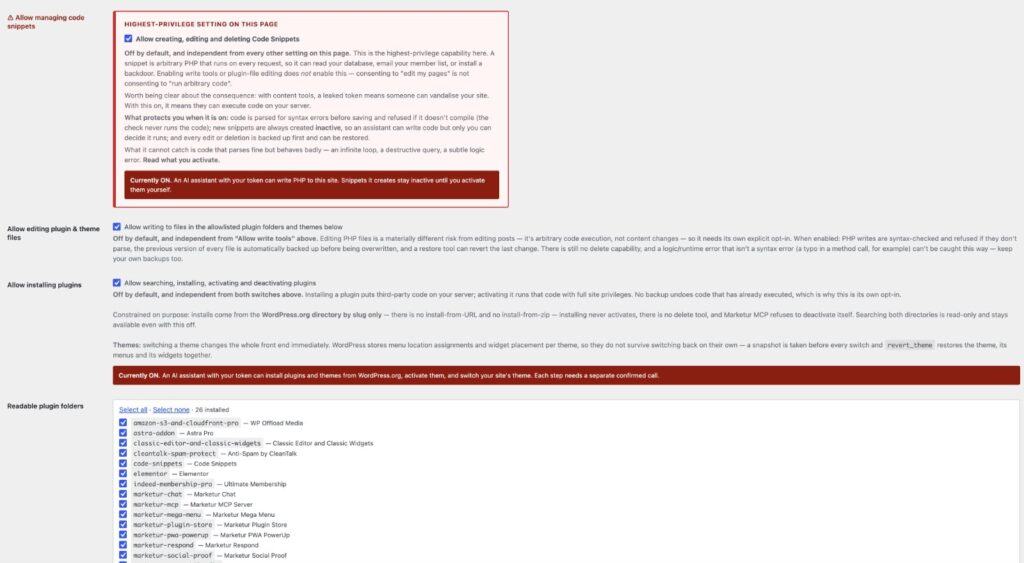
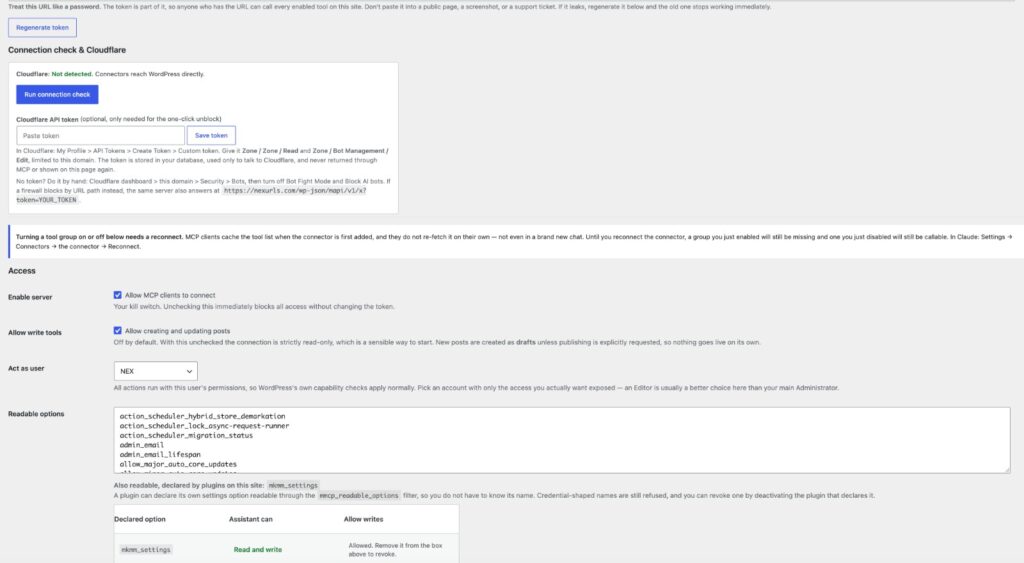
Marketur MCP includes configurable permissions, WordPress capability checks, separate controls for sensitive operations, and supported backup and undo workflows.
You decide what your AI assistant is allowed to access and change.
Keep Your WordPress Website and Add AI
You don't need to move your website to another platform or replace your existing WordPress setup.
Marketur MCP works with your existing WordPress installation and adds a way for supported AI assistants to interact with it.
It's designed for bloggers, developers, agencies, small businesses, and anyone who wants to spend less time switching between WordPress and an AI chat window.
If you're looking for a WordPress MCP server, an AI WordPress management plugin, or a way to connect ChatGPT or Claude to WordPress, Marketur MCP is worth exploring.
Learn more about Marketur MCP, its supported features, and how to get started at https://marketur.net/marketur-mcp/

Reactions
No reactions yet. Record a short about this link and it shows up here, in Reels and in the community feed.
Is nexurls.com/@nexurls your site? Sign in to verify it and get a Verified badge, full stats and a link-back badge.
A closer look at Marketur MCP WordPress Plugin for ChatGPT and Claude
What Marketur MCP does for WordPress
Marketur MCP is a WordPress plugin that connects compatible AI assistants (the page mentions ChatGPT and Claude) to an existing WordPress site using the Model Context Protocol (MCP). It lets those assistants inspect your site, perform permitted actions, and verify results rather than only giving instructions you must apply yourself.
The plugin focuses on letting AI create and edit content, manage supported Elementor content, review and update supported Yoast SEO fields, inspect plugins and themes, and work with supported membership and affiliate workflows.
How it works and safety controls
MCP gives the AI controlled access to WordPress tools and site information; available actions depend on your WordPress installation and which tools you enable.
Marketur MCP includes configurable permissions, WordPress capability checks, separate controls for sensitive operations, and backup and undo workflows so you can decide what the AI assistant is allowed to access and change.
Who will find this useful
The page describes the plugin as suitable for bloggers, developers, agencies, small businesses, and anyone who wants to avoid switching between WordPress and an AI chat window when managing content or SEO.
It is presented as a connector for existing WordPress installations rather than a site builder, so it’s aimed at people who want AI to work on their current site through permitted tools.
Questions people ask about Marketur MCP WordPress Plugin for ChatGPT and Claude
- Can ChatGPT or Claude actually edit my WordPress site?
- Yes; with a supported WordPress MCP connection the page says ChatGPT and Claude can perform permitted actions such as creating pages, editing content, updating SEO fields, inspecting plugins, and verifying saved changes.
- Is it safe to give AI access to my site?
- The plugin includes configurable permissions, capability checks, separate controls for sensitive operations, and backup/undo workflows so you control what the assistant can access and change.
- Do I need to move my site to use Marketur MCP?
- No; the page states Marketur MCP works with your existing WordPress installation and connects supported AI assistants to it.
Marketur MCP WordPress Plugin for ChatGPT and Claude was shared on NexURLs by NEX on November 8, 2026, in Tech & AI. So far it has 1 like from members.
What we found on this site
- Built with
- WordPress
- Served through
- Apache
- Home page answered in
- 222 ms
- Trackers
- None found
- Ads
- None found
- RSS feed
- No
- AI crawlers
- Lets them in
- llms.txt
- Yes
- Set up for phones
- Yes
- Real-visitor speed
- Not enough visitors for Google data
- Popularity
- Top 200,000 domain (Cloudflare)
- Google safety check
- No threats found
- Domain registered
- 2026
- Domain renews
- October 2027
Checked November 8, 2026 from the site’s own code and public records. See how the rest of the web compares in the NexURLs Internet Report.
Featured in
Quick answers
What is Marketur MCP WordPress Plugin for ChatGPT and Claude?
Marketur MCP WordPress Plugin for ChatGPT and Claude (nexurls.com/@nexurls): A WordPress plugin (Marketur MCP) that connects ChatGPT or Claude to your site so AI can inspect and perform permitted edits and management tasks. Visit to enable AI-driven content editing, plugin/theme inspection, and SEO improvements while keeping configurable safety controls.
Who shared Marketur MCP WordPress Plugin for ChatGPT and Claude on NexURLs?
It was shared by NEX in November 2026. Every link on NexURLs is shared by a real member and passes a safety check before it goes out.
What do people think of Marketur MCP WordPress Plugin for ChatGPT and Claude?
On NexURLs it has 1 like from members so far. Read the discussion on this page, or add your own take.
What are some sites like Marketur MCP WordPress Plugin for ChatGPT and Claude?
Members found these close to it: ChatGPT, LibreChat, Open WebUI. The full list is on this page under Sites like Marketur MCP WordPress Plugin for ChatGPT and Claude.
Sites like Marketur MCP WordPress Plugin for ChatGPT and Claude
- ChatGPTchatgpt.com
- LibreChatlibrechat.ai
LibreChat is an open-source platform that unifies your AI conversations in a customizable interface. Someone would...
- Open WebUIopenwebui.com
Open WebUI is a self-hosted AI platform that lets you connect any model, extend functionality with Python, and keep...
- Marketur: Find opportunities & build with WordPress toolsmarketur.net
Marketur offers WordPress plugins, tools and services that the creator built and uses on their own sites to run chat...
- Janjan.ai
Jan is an open-source platform that lets you run AI models locally or connect to cloud models like GPT and Claude...
- Poepoe.com
More Tech & AI finds
- NetBSD 11 desktop on a Raspberry Pi 4neongd.com
- Playing with the STM32MP2serd.es
- Virtualized Redox: from Virtio-FS to Cloud Hypervisor, and beyondredox-os.org
- Nspawn 3.0: A Docker-compatible Engine API for systemd-nspawn containersblog.nspawn.org
- BUGATTI BUILT A TV THAT UNFOLDS IN 45 SECONDS.youtube.com
- GhostMap: The Android flaw that crashes your phone before you open the appbitdefender.com
Feeling lucky? Try the random website generator.
Where people went next
Nobody has added a next stop yet. Be the first.