Marketur MCP WordPress Plugin for ChatGPT and Claude
Connect ChatGPT or Claude to WordPress and let AI edit pages, manage content, improve SEO and work directly on your website.

Marketur MCP Lets ChatGPT and Claude Work Directly on Your WordPress Website
If you've ever used ChatGPT or Claude to help manage a WordPress website, you probably know the routine. You ask AI to make a change, get instructions or code, and then go back into WordPress to do everything yourself.
I wanted something different, so I built Marketur MCP, a WordPress MCP plugin that connects AI assistants directly to an existing WordPress website.
Instead of just telling you what to do, ChatGPT or Claude can inspect your actual website, use the tools you've allowed, make supported changes, and check the results.
What Is Marketur MCP?
Marketur MCP is a WordPress plugin built around the Model Context Protocol (MCP).
MCP allows AI assistants to communicate with external tools and services. In this case, it gives compatible AI assistants controlled access to WordPress.
You can connect ChatGPT or Claude and ask them to help manage your website using everyday language.
For example, instead of manually opening dozens of WordPress pages to update information, you can ask your AI assistant to find the relevant content, make the changes you've approved, and verify the results.
What Can You Do With Marketur MCP?
Marketur MCP provides tools for several common WordPress tasks.
Create and edit WordPress content
Ask ChatGPT or Claude to create pages, update blog posts, edit existing content, organize categories, and work with supported Elementor content.
Improve WordPress SEO
Manage supported Yoast SEO titles, meta descriptions, focus keywords, and indexing settings. You can also ask AI to inspect existing content for keyword conflicts and missing SEO information.
Manage plugins and themes
Inspect installed plugins and themes, review site information, search the WordPress plugin directory, and perform permitted management tasks.
Work with memberships and other integrations
Marketur MCP includes tools for supported membership, affiliate, and Marketur plugin workflows. This can make managing a more complicated WordPress website much easier.
Review your website before making changes
One of the biggest advantages is that your AI assistant can inspect what is already there instead of guessing how your website works.
Can ChatGPT Really Edit a WordPress Website?
Yes. With a supported WordPress MCP connection, ChatGPT can perform permitted actions on your actual website.
You could ask it to:
-
Create a new WordPress page and configure its SEO.
-
Find outdated information across existing posts.
-
Review installed plugins.
-
Inspect and update supported Elementor content.
-
Check internal links and identify potential problems.
-
Verify that requested changes were actually saved.
The available actions depend on your WordPress installation and which tools you've enabled.
Built With WordPress Safety in Mind
Giving AI access to a live website should never mean giving it unlimited control.
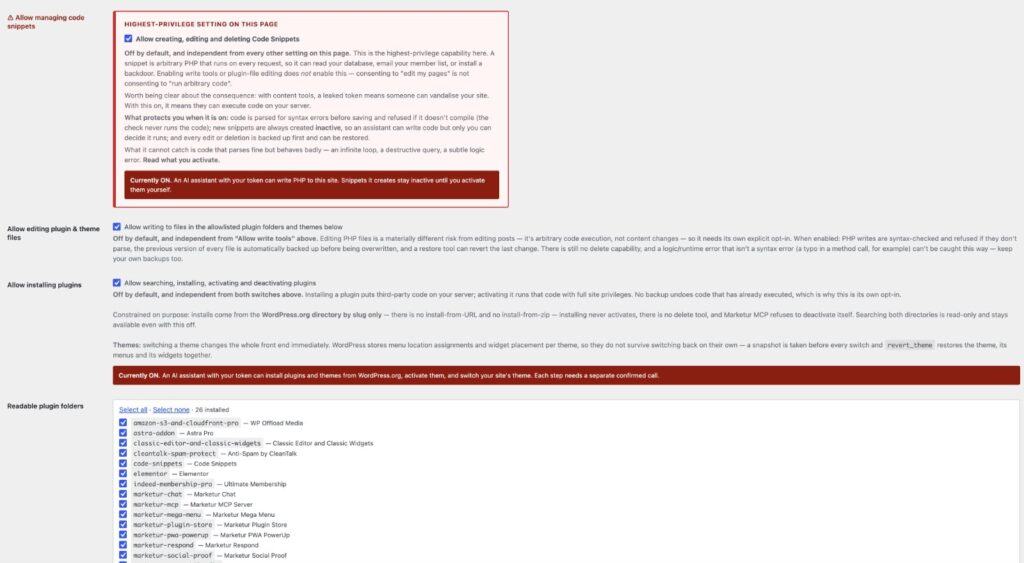
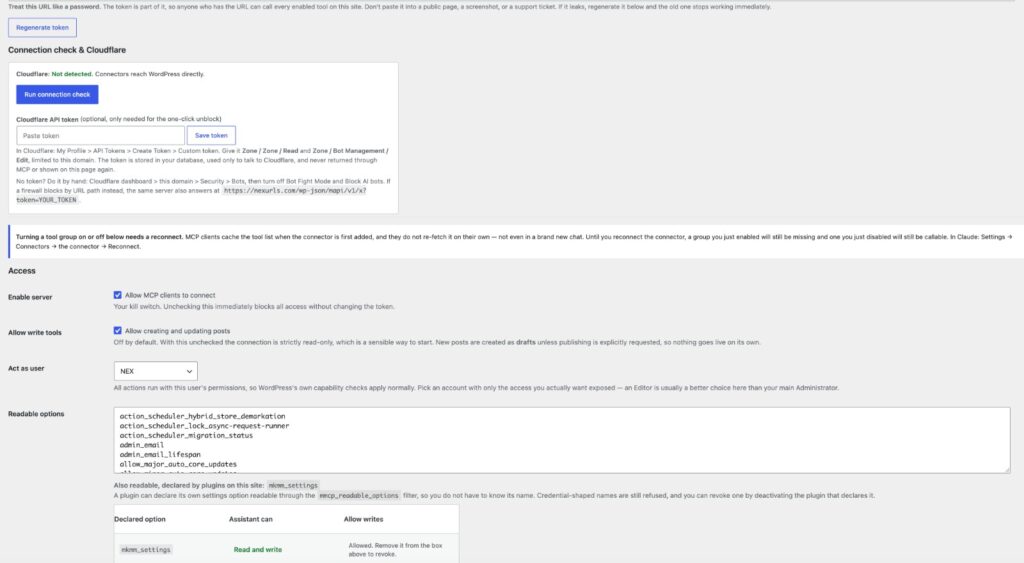
Marketur MCP includes configurable permissions, WordPress capability checks, separate controls for sensitive operations, and supported backup and undo workflows.
You decide what your AI assistant is allowed to access and change.
Keep Your WordPress Website and Add AI
You don't need to move your website to another platform or replace your existing WordPress setup.
Marketur MCP works with your existing WordPress installation and adds a way for supported AI assistants to interact with it.
It's designed for bloggers, developers, agencies, small businesses, and anyone who wants to spend less time switching between WordPress and an AI chat window.
If you're looking for a WordPress MCP server, an AI WordPress management plugin, or a way to connect ChatGPT or Claude to WordPress, Marketur MCP is worth exploring.
Learn more about Marketur MCP, its supported features, and how to get started at https://marketur.net/marketur-mcp/
Would you use this tool?
1 votes
Questions people ask
What is a WordPress MCP plugin?
A WordPress MCP plugin connects AI assistants to WordPress using the Model Context Protocol. It allows supported assistants such as ChatGPT and Claude to inspect website information and perform permitted tasks.
Can ChatGPT edit my WordPress website?
Yes. With Marketur MCP installed and connected, ChatGPT can create and edit supported WordPress content, update SEO settings, inspect plugins, and perform other actions you authorize.
How do I connect Claude to WordPress?
Install Marketur MCP on your WordPress site, configure its connection and permissions, and connect Claude using the supported MCP setup. Start with read-only access to verify the connection.
Does Marketur MCP work with Elementor?
Yes. Marketur MCP includes tools for inspecting and updating supported Elementor content. Available functionality depends on the website and its installed integrations.
Can AI improve my WordPress SEO?
Marketur MCP can help AI assistants inspect and update supported Yoast SEO fields, find missing metadata, identify keyword conflicts, and review content. This can improve SEO workflows, but rankings are never guaranteed.
Is Marketur MCP an AI website builder?
Marketur MCP is a WordPress connector rather than a standalone website builder. It lets supported AI assistants work on existing WordPress installations, including creating and updating pages through permitted tools.
A secret link from the creator. Open it with 200 NexCredits. Most of it goes to the creator.
⚠️ This link leaves NexURLs. NexURLs did not make it and does not control what is on it. Adult content is not allowed, so if it is not what was promised, use Report on this Spot.
Rate this Spot
Show some love
000005
Video reactions
Record a reaction →No reactions yet. Record a short video about this Spot and it shows up here and in Reels.
Make your own version with the same kind, look and headings.
📖 Guestbook
Sign in to sign the guestbook.
Related Spots
 How I find great websitesShow and tell · 1 likes
There's always another URL.
NexURLs is a button that takes you somewhere great on the web, picked by real people. Create a Spot like this one, or just press Next.